
Mark up a mesh by painting it
AM Landmark turns flat, named colours into a working layer on top of your geometry. Paint the regions once — jaw line, brow ridge, the seam you keep losing — mirror them to the other side, and carry the whole pass to the next scene as a file.
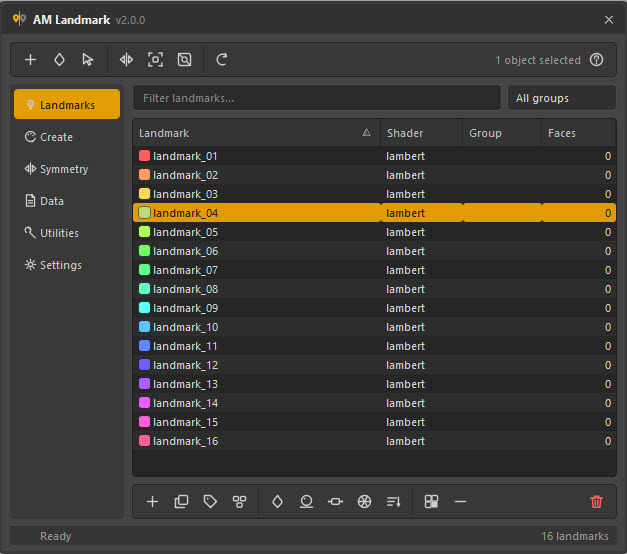
Start where you are
-
I just want it running
Drop the folder on Maya's script path and put two lines on a shelf button. No plug-in, no compiled parts, nothing to load at start-up.
-
I need colours on a mesh
Generate a palette you can actually tell apart, assign it to face selections, and see at a glance which parts you have not covered yet.
-
I marked one side only
Mirror the assignment across the plane — by geometry, by Maya's own symmetry, or by walking the mesh topology from its seam.
-
I need it in the next scene
Save the pass as JSON and load it onto the same asset, a renamed one, or a mesh that has since been rebuilt.
What it does
A landmark is a shader with a name. Not a set, not a display layer, not a comment in a spreadsheet — a real Maya shader, tagged so the tool can find it again after you rename it, and so it can never mistake one of your asset's materials for something it owns. Assign it to a face selection and the region is marked, in the viewport, in every future session, in the saved scene.
Colours you can actually tell apart. Five generators, all previewed live: an even hue wheel, golden-ratio spacing that stays spread at any count, a two-colour ramp in three interpolation spaces, five harmony schemes, and random colours that are rejected until they clear a minimum perceptual distance from everything already picked.
Symmetry that survives a pose. Mirror by matching face centres, by handing the job to Maya's own symmetry, or by walking the mesh's topology outward from its seam edge — the last of which keeps pairing correctly on a mesh that has been deformed far away from its symmetry plane. Check the result before you commit: 1 984 of 1 984 faces matched is a much better answer than a mirror that quietly skipped eight.
Files that outlive the topology. Face ids only mean something on the mesh they were written from, so a saved pass can also carry a UV and a position per face. Load it back onto a retopologised mesh, a rebuilt one, or geometry that came home from another package carrying nothing but vertex colours.
Everything is scriptable. The whole feature set lives in a layer that never imports Qt, so a shelf button, a batch job or another tool can drive it without a window ever being built.
The rest of the tool
-
Coverage
3 214 of 3 968 faces carry a landmark. Then select the ones that do not and fix it, instead of flying around the model looking for grey.
-
Shaders on your terms
Start on a flat
surfaceShader, convert tolambert,blinnorstandardSurfacelater without losing a single face assignment, and edit the node by hand whenever the tool is in your way. -
A real API
create_landmark,assign,mirror_assignments,coverage_report,bake_to_vertex_colors— the same functions the window calls. -
When it misbehaves
Why the mirror did nothing, why the colours look darker than you picked them, why a load found no meshes.