Symmetry
Mark one side, get both. Three ways to answer "which face is the mirror of this one?", because no single one is right for every asset.
-
Match methods
Spatial, Maya's own symmetry, and a topological walk from the seam — what each one actually does, and when to reach for it.
-
Checking and fixing
Prove the mirror will be complete before you run it, find the faces that have no partner, and choose a tolerance that means something.
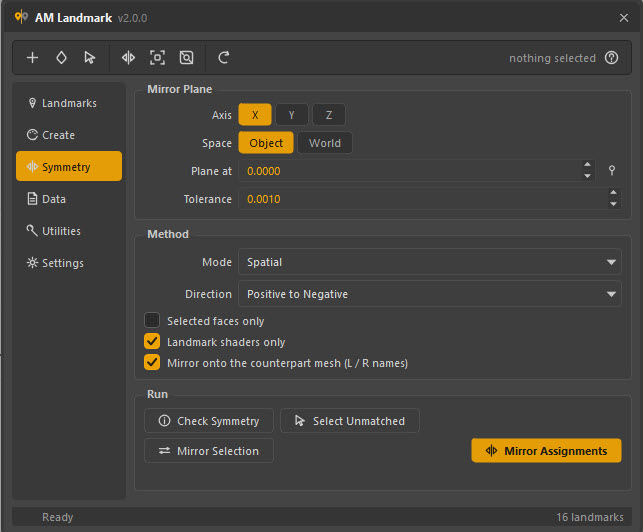
The mirror plane
| Control | What it means |
|---|---|
| Axis | Which plane to reflect across. X is left/right and is what you want almost always; Y is up/down, Z is front/back. |
| Space | Object mirrors in the mesh's own local space — correct for a mesh modelled on its own origin, and immune to the transform being moved. World mirrors in world space, for a mesh whose local origin is somewhere unhelpful. |
| Plane at | Where the plane sits along the axis. 0 for a character on the world centre line. The pin button beside it takes the centre of the selected mesh's bounding box, which is the right answer for a prop modelled off-origin. |
| Tolerance | How far a mirrored face centre may land from its partner and still count as a match. See Checking and fixing. |
Direction
| Direction | Copies |
|---|---|
| Positive to Negative | From +X to −X (or +Y, +Z). |
| Negative to Positive | The other way. |
| Swap Sides | Both, in one pass — a true swap, not two runs. |
Swap Sides reads the whole assignment before writing anything, so
L_cheek and R_cheek genuinely trade places rather than one overwriting the
other.
Options
| Option | Effect |
|---|---|
| Selected faces only | Mirror just the patch you have selected, instead of the whole side. Use this when you have fixed one region and do not want to re-mirror everything. |
| Landmark shaders only | Leave your asset's real materials where they are. On by default — a landmark pass should never move a look-dev assignment. |
| Mirror onto the counterpart mesh (L / R names) | When the mesh has an opposite-side twin by name — L_arm_geo / R_arm_geo — mirror onto that mesh instead of onto itself. |
The name tokens understood by the last one are the usual ones: left_/right_,
lft_/rgt_, lt_/rt_, L_/R_, _l/_r and their capitalised forms.
The earliest token in the name wins, and only one swap is made — so
L_arm_L_tip becomes R_arm_L_tip, not R_arm_R_tip.
Running it
| Button | Does |
|---|---|
| Check Symmetry | Reports how many faces found a partner. Run this first. |
| Select Unmatched | Selects the faces the last check could not pair. |
| Mirror Selection | Selects the mirror of the currently selected faces. Does not assign anything — a component-level Select Mirror. |
| Mirror Assignments | Does the work. |
The result line under the buttons keeps the last report, and the status bar carries the summary.
Why checking is a separate button
A mirror that quietly does 99 % of the job is worse than one that fails: the model looks right at a glance and the missing 1 % surfaces days later in somebody else's shot. Checking first turns a silent partial success into a number you can act on.
What gets mirrored
Every landmark assignment on the source side, in one undo step. Landmarks themselves are not duplicated or renamed — the same landmark ends up on both sides, which is almost always what you want for a symmetric region.
If you want the two sides to be different landmarks (L_cheek and
R_cheek), mirror first, then select the mirrored faces
(Select Faces on the landmark, or Mirror Selection) and assign the
other landmark to them.
From a script
from Am_landmark.core import symmetry

symmetry.mirror_assignments(
    axis="X",
    space="Object",
    direction=symmetry.DIR_POS_TO_NEG,
    mode=symmetry.MODE_SPATIAL,
    tolerance=0.001,
)
The full signature is in the Python API.