Coverage and utilities
What you have not marked yet, one landmark per mesh shell, transfer between meshes, baking to vertex colours, and the cleanup.
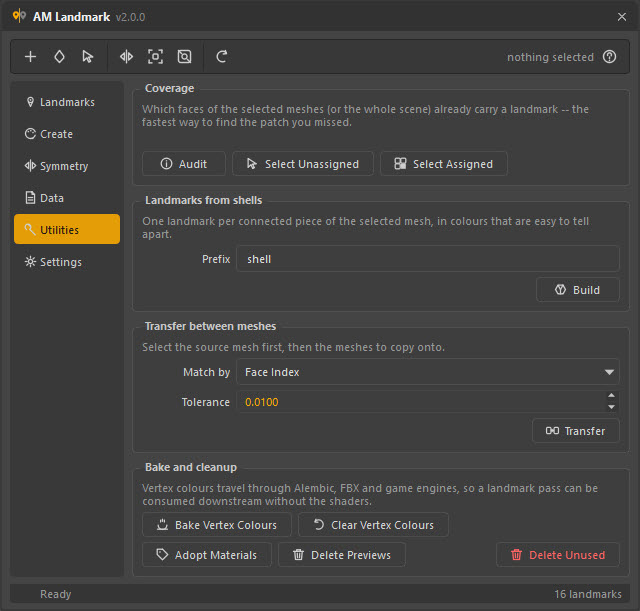
Coverage
The question this answers — did I miss a patch? — is the one that otherwise means flying around the model looking for grey.
Select the meshes you care about (or select nothing to audit the whole scene) and press Audit:
3 214 of 3 968 faces carry a landmark (81.0 %)754 faces have no assignment at allheadShape: 754 uncovered
| Button | Selects |
|---|---|
| Select Unassigned | Every face that carries no landmark — including faces wearing one of your own materials. |
| Select Assigned | Every face that does carry one. |
Select Unassigned is the important one: it puts the gap in your viewport selection, so the fix is assign a landmark to what is already selected.
Audit before you save
A pass that is 100 % covered can be loaded onto a rebuilt mesh and audited again to prove nothing was lost. A pass that started at 81 % gives you nothing to compare against.
Landmarks from shells
One landmark per connected piece of the selected mesh, in colours that are easy to tell apart.
| Field | Effect |
|---|---|
| Prefix | Names them shell_01, shell_02, … |
| Build | Creates and assigns them, using the Create page's shader type and group. |
A shell is a set of faces connected through shared edges — what you would get from Select → Select Shell in Maya, computed here directly from the mesh topology. On a prop that is already modelled in pieces, this is a complete landmark pass in one press.
Why not just call Maya's shell selection
polySelect -extendToShell works through the viewport selection, which
means one selection change and one undo entry per shell — on a mesh with
forty pieces that is forty of each. Walking the edge table gives the same
answer with no scene side effects at all, and it is fast enough not to
notice.
Transfer between meshes
Copies one mesh's landmark assignment onto other meshes. Select the source mesh first, then the meshes to copy onto.
| Match by | Needs | Use for |
|---|---|---|
| Face Index | Identical face counts | A LOD copy, a re-imported cache, a duplicate |
| Closest Position | The shapes to be roughly in the same place | A retopologised or re-ordered mesh |
Tolerance is how far a face centre may be from its counterpart, in scene units, and only applies to Closest Position.
Meshes that cannot be matched are skipped and named, rather than silently receiving nothing:
headGeo_LOD2 has 812 faces, source has 3 968 — use Closest Position.
This is the scene-to-scene version of the same idea that loading a file by position does across files.
Bake to vertex colours
Writes each landmark's colour into the mesh's vertex colours, and turns colour display on.
Vertex colours travel through Alembic, FBX and game engines, so a landmark pass authored here can be consumed downstream without shipping shaders — a mask for a shader network, a weight-painting reference, a region id for an engine.
| Button | Does |
|---|---|
| Bake Vertex Colours | Paints every landmark's faces with its colour. |
| Clear Vertex Colours | Deletes the colour set and turns colour display off. |
The round trip works too: geometry that comes home from another package carrying nothing but vertex colours can be turned back into landmarks by loading the pass with Match faces by → Colour Set.
Cleanup
| Button | Does |
|---|---|
| Adopt Materials | Tags materials that already exist in the scene as landmarks, so the list can manage them. They keep their names, colours and assignments — this only adds the tag. Asks first, and lists what it is about to adopt. |
| Delete Previews | Removes the AM_landmark_preview_grp group of preview spheres. |
| Delete Unused | Deletes every landmark nothing is assigned to. Asks first. |
Adopt Materials is how a scene that was marked up before this tool existed — or by hand, in the Hypershade — gets brought under management.
Why cleanup never touches your materials
Delete Unused only ever considers tagged landmarks, and never a
default, referenced or locked node. A cleanup that matched by name pattern
instead would be one wildcard away from deleting a material of yours called
mat_wood on its way to mat_*. Nothing here matches on names.