Saving
What goes in the file, and the one decision that determines what it can be loaded onto later.
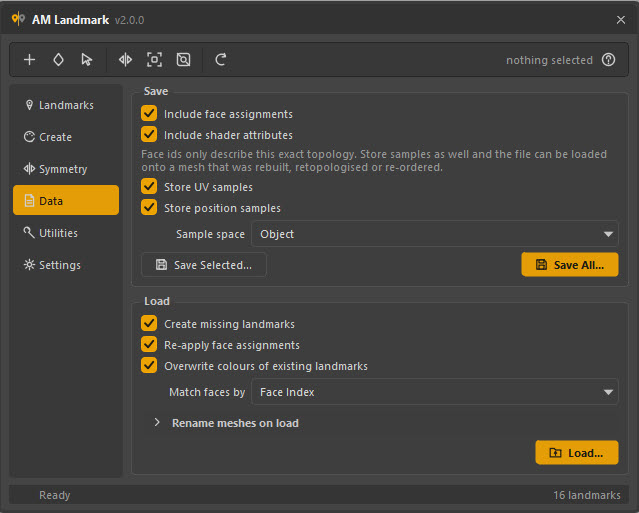
| Button | Writes |
|---|---|
| Save All… | Every landmark in the scene. |
| Save Selected… | Only the landmarks selected in the list — also available as Save Selected… in the right-click menu. |
The file dialog remembers the last folder you used, and falls back to the folder the current scene lives in.
What is always written
Per landmark: the name, node type, colour, group, notes, stable id and shading group name.
Include face assignments
On by default. Without it you get a palette file: the colours and their names, with nothing attached to any geometry. That is genuinely useful — it is how you carry a house palette between assets — but it is not a landmark pass.
Include shader attributes
Carries the look-dev extras a type supports: transparency and incandescence on a
lambert, roughness and metalness on a standardSurface, and so on.
Only a curated list per type travels, and only plugs that are not connected — a colour driven by a texture is skipped rather than being flattened to a constant on the way out.
Why not just save everything settable
Walking cmds.listAttr(settable=True) and writing every attribute it can
read is the one-line version of this feature, and it is wrong three ways:
hundreds of irrelevant plugs per shader, a slow export, and — worst — a load
that writes values onto plugs which have since been connected to something.
The whitelist is short on purpose.
Samples
This is the decision that matters.
Face ids only describe this exact topology. Store samples as well and the file can be loaded onto a mesh that was rebuilt, retopologised or re-ordered.
| Option | Stores | Enables |
|---|---|---|
| Store UV samples | One UV per assigned face, in the mesh's current UV set | Match faces by → UV |
| Store position samples | One face centre per assigned face | Match faces by → Position |
| Sample space | Whether positions are in Object or World space | — |
Both are on by default. Samples are written in ascending face-id order, one per assigned face — so their cost is proportional to how much of the model you have marked, not to how big the model is.
Object or World?
| Space | Follows the mesh if it moves | Use for |
|---|---|---|
| Object | Yes | The normal case. The pass belongs to the model, not to where it is standing. |
| World | No — samples are pinned where they were when saved | A set or environment where the pieces are placed and the placement is the point. |
How big does it get?
Roughly, per assigned face: about 20 bytes for a UV sample and 30 for a position sample, as text.
| Assigned faces | Face ids only | With both samples |
|---|---|---|
| 500 | ~2 KB | ~30 KB |
| 5 000 | ~4 KB | ~260 KB |
| 40 000 | ~10 KB | ~2 MB |
If you are marking up a whole dense model and file size matters, turn off the one you know you will not use. If you are marking regions on a character — the usual case — leave both on and never think about it again.
Save twice
There is nothing wrong with keeping two files: a small ids-only one for "load this back onto this exact asset", and a full one with samples for "load this onto whatever the model becomes". The loader tells you which methods a file can support.
From a script
from Am_landmark.core import landmark_io, shaders

landmark_io.export_landmarks(
    shaders.landmark_shaders(),          # or a list of names
    "d:/asset/head_landmarks.json",
    include_assignments=True,
    include_attributes=True,
    include_uv=True,
    include_point=True,
    point_space="Object",
)
The path gets a .json extension if it does not have one, and the folder is
created if it does not exist.