Loading
Rebuild a pass in this scene — on the same asset, a renamed one, or a mesh whose face ids no longer mean what they meant.
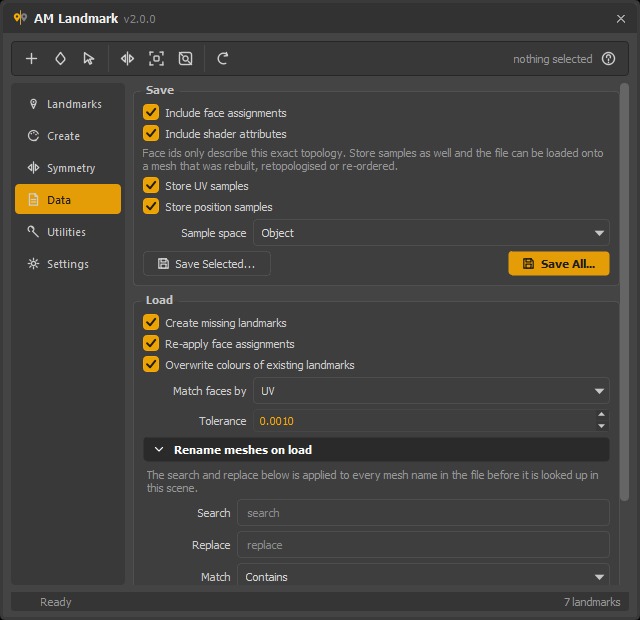
Match faces by decides how a stored assignment finds its faces again. The tolerance appears only for the methods that use one.
What to bring back
| Option | Effect |
|---|---|
| Create missing landmarks | Build shaders this scene does not have yet. Off means "only update what is already here". |
| Re-apply face assignments | Put the faces back on their landmarks. Off loads the palette only — colours, names, groups — and leaves the geometry alone. |
| Overwrite colours of existing landmarks | On, a landmark that already exists takes the file's colour. Off, the scene wins and only the assignment is restored. |
Match methods
Face ids describe one topology and nothing else, so the loader can find the faces four ways.
| Method | Matches through | Survives | Needs |
|---|---|---|---|
| Face Index (default) | The stored ids | Nothing but the same topology — exact and instant when it is | — |
| UV | The face's UV centre | Retopology, a different face count, a different face order | UV samples in the file, and a shared UV layout |
| Position | The face's centre, in object or world space | A rebuild, a re-order, a different resolution | Position samples, and the shape to still be roughly where it was |
| Colour Set | A baked vertex colour equal to the landmark's | A round trip through another package that kept only vertex colours | A colour set on the mesh — see baking |
Tolerance is how close a stored sample has to land to count as the same face. Each method measures in its own units — UV is a 0–1 space, position is scene units, colour is an RGB distance — so changing the method resets the tolerance to that method's sensible default.
Asking for a method the file cannot support
If you pick UV and the file was saved without UV samples, the load does not quietly match by face index instead. It says so, then falls back — because the two answers differ exactly when it matters, and a silent substitution would look like the pass loaded correctly onto a mesh where it landed on the wrong faces.
Which one to use
| Situation | Method |
|---|---|
| Same asset, same day | Face Index |
| The model was retopologised, UVs were transferred | UV |
| The model was rebuilt or re-ordered, UVs changed | Position |
| Geometry came back from ZBrush / Blender / an engine with vertex colours | Colour Set |
| You are not sure | Face Index first — then audit coverage and try another if it looks wrong |
Samples that find nothing within the tolerance are counted and reported:
12 sample(s) found no face within 0.001 — raise the tolerance.
Rename meshes on load
A file authored on one asset can be re-targeted at another. Expand Rename meshes on load and the search and replace below is applied to every mesh name in the file before it is looked up in this scene.
| Field | Effect |
|---|---|
| Search / Replace | The text to change. |
| Match | Contains (anywhere in the name), Prefix, Suffix, or Regex. |
| Namespace | Put every mesh name into this namespace — char turns \|grp\|mesh into \|char:grp\|char:mesh. |
| Strip namespaces from the file's names first | Remove whatever namespace the file was written with, before anything else. |
The two work together: strip first, then search-and-replace, then
namespace. That order is what lets a file saved from a referenced rig
(char_01:headShape) load onto a clean model (headShape), or the reverse.
An invalid regular expression falls back to a literal match rather than aborting — you are typing into a text field, and a half-finished pattern should not throw away a load.
Reading the report
The status bar summarises:
Loaded 14 landmarks (9 new, 5 updated), 3 214 faces assigned by UV
If anything needs attention, a dialog gives you the detail:
| Message | Means |
|---|---|
| This file has no UV samples… | The file was saved without them; it loaded by face index. |
| N sample(s) found no face within X | Raise the tolerance, or the meshes really are different. |
| headShape (face ids out of range) | The file describes more faces than this mesh has. The valid ones were assigned. |
| headShape (no colour set to match against) | Colour Set was chosen and the mesh carries no vertex colours. |
| A list of mesh names | The file mentions meshes this scene does not have. Check Rename meshes on load. |
From a script
from Am_landmark.core import landmark_io

report = landmark_io.import_landmarks(
    "d:/asset/head_landmarks.json",
    create_missing=True,
    apply_assignments=True,
    match_method=landmark_io.MATCH_UV,
    tolerance=0.001,
    search="old_", replace="new_", match_mode="Prefix",
)
print(report["assigned"], report["messages"])
Loading is one undo step, however many landmarks it rebuilds.