Preferences
Everything on the Settings page, and where it is kept.
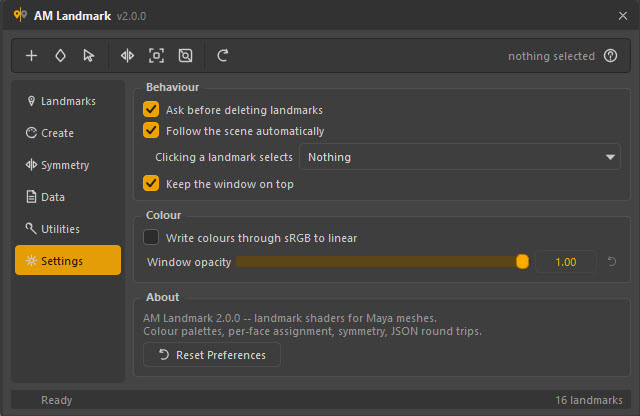
Behaviour
| Setting | Default | Does |
|---|---|---|
| Ask before deleting landmarks | On | Confirms before Delete and Delete Unused. Both are one undo step either way. |
| Follow the scene automatically | On | Rebuilds the list when the scene is opened, on undo and redo, and updates the selection read-out live. Turn it off on a very heavy scene where you would rather press F5 yourself. |
| Clicking a landmark selects | Nothing | What a click in the list does to Maya's selection — see below. |
| Keep the window on top | On | Floats the window above Maya. Off lets it go behind, which suits a second monitor. |
Clicking a landmark selects
| Value | A click in the list |
|---|---|
| Nothing | Leaves the viewport selection alone. What you want while assigning: pick faces once, then try several landmarks on them. |
| Its faces | Selects the geometry wearing it. Good for reviewing a pass. |
| Its shader node | Selects the shader, so the Attribute Editor follows the list. Good for a session spent dialling shaders in. |
Colour
| Setting | Default | Does |
|---|---|---|
| Write colours through sRGB to linear | Off | Converts on the way into a shader plug and back on the way out. See Shaders → Colour space. Switching it re-reads every landmark, so the list updates immediately. |
| Window opacity | 1.00 | Makes the window translucent, down to 0.35 — for working with it over the viewport. |
About
Check for Updates asks the server now and opens the update window, which also holds the automatic-check and channel settings.
Reset Preferences forgets every stored setting, including the window's size and position, every field on every page, and the update settings. Reopen the window to get the defaults.
Where they live
One Maya optionVar called AM_landmark_state_json, holding a JSON document:
the window geometry, the page you were on, and the value of every field on every
page — the palette generator and its sliders, the symmetry settings, the save and
load options, the transfer settings.
They follow your Maya user preferences, not the scene, so a landmark pass opened on another machine uses that machine's settings.
import maya.cmds as cmds
print(cmds.optionVar(q="AM_landmark_state_json"))    # read it
cmds.optionVar(remove="AM_landmark_state_json")      # same as Reset Preferences
From the tool's own API:
from Am_landmark.core import option_vars
option_vars.get("gen_prefix", "landmark")
option_vars.put("gen_prefix", "region")
option_vars.reset()
Why one blob and not thirty optionVars
Thirty separate vars is thirty things to migrate when a field is renamed, and thirty things left behind in a user's preferences when one is removed. One document is one thing to write, one thing to delete, and readable when you want to know what the tool remembered.
What is not a preference
Some things live with the data rather than with you, on purpose:
| Where it lives | |
|---|---|
| A landmark's colour, group, notes | On the shader, in the scene |
| Which shader type a landmark is | On the shader |
| The symmetry axis a mesh was mirrored with | Nowhere — it is a choice you make per run |
| What a saved file can be loaded by | In the file, as samples |