
Every rig tool, one flick away
AM Rig Menu is a marking menu for posing rigs in Maya. Hold your hotkey, click in the viewport, and flick: reset a control, mirror a pose, switch a space or an IK/FK limb, select everything below — without a trip to the shelf, the Channel Box or the Outliner.
It knows rigs built with AM_Rig and offers its full set there. On any other rig it still gives you the everyday essentials.
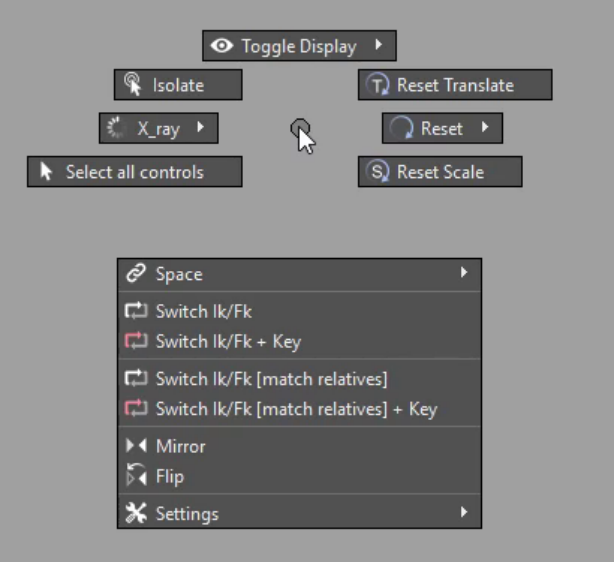
Start where you are
-
I want it running
Drag one file into a Maya viewport and press Install. It joins the AM_Tools module your other AM tools use, and starts with Maya from then on.
-
I installed it — now what?
Pick the key that raises the menu, hold it, click, and flick towards a command. Two minutes, and you will not go back.
-
What is in the menu?
Every item, where it sits, what it does, and which ones only appear on an AM_Rig control.
-
Spaces and IK/FK
Switch a control's space without it jumping, add new spaces to a control, and match an IK limb to FK — keyed, if you ask.
-
I build rigs
The attributes and naming the menu looks for, so a rig of your own gets the same options an AM_Rig does.
-
Something is wrong
The menu does not open, an item is missing, a switch did nothing — the usual causes, and what to do about each.
At a glance
| Price | Free — MIT licence |
| Maya | 2020 and later, on Windows, macOS and Linux |
| Install | Drag drag_n_drop_install.py into a viewport |
| Lives in | The shared AM_Tools module, with a shelf button |
| Plug-ins | Optional — weightDriver, chosen in the installer |
| Updates | Checked once a day in the background; you decide |