Reset
Reset puts attributes back to their default values — the values the rigger set as defaults, not zero. A control whose rest pose has its arm at 45° goes back to 45°.
Every reset works on all selected controls, and skips any attribute that is locked or connected.
On the ring
| Item | Resets |
|---|---|
| Reset Translate (↗) | translate X, Y and Z |
| Reset Scale (↘) | scale X, Y and Z |
The Reset submenu (→)
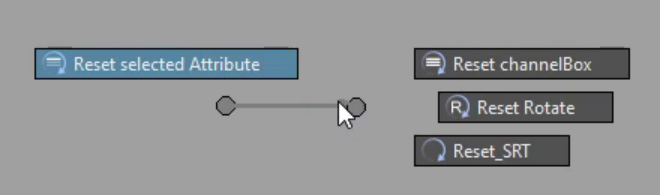
| Item | Resets |
|---|---|
| Reset channelBox | every keyable attribute of the control — custom ones included |
| Reset Rotate | rotate X, Y and Z |
| Reset SRT | translate, rotate and scale together |
| Reset selected Attribute | only the channels highlighted in the Channel Box |
| Reset all below | AM_Rig only. Every keyable attribute of the control and every control below it |
Resetting a few channels
Highlight the channels in the Channel Box first — for example only rotate Y and a custom twist — then flick Reset ▶ Reset selected Attribute. Nothing else on the control moves.
Reset all below follows the rig's own control hierarchy (Maya's controller tags), so on a hand control it resets every finger, and on the root it resets the whole character.