Colour
Colour is never more than a flick away: the hue ring is the toolbar, the Pick Color window holds fourteen palettes, and an eyedropper takes any colour off the screen.
On the ring
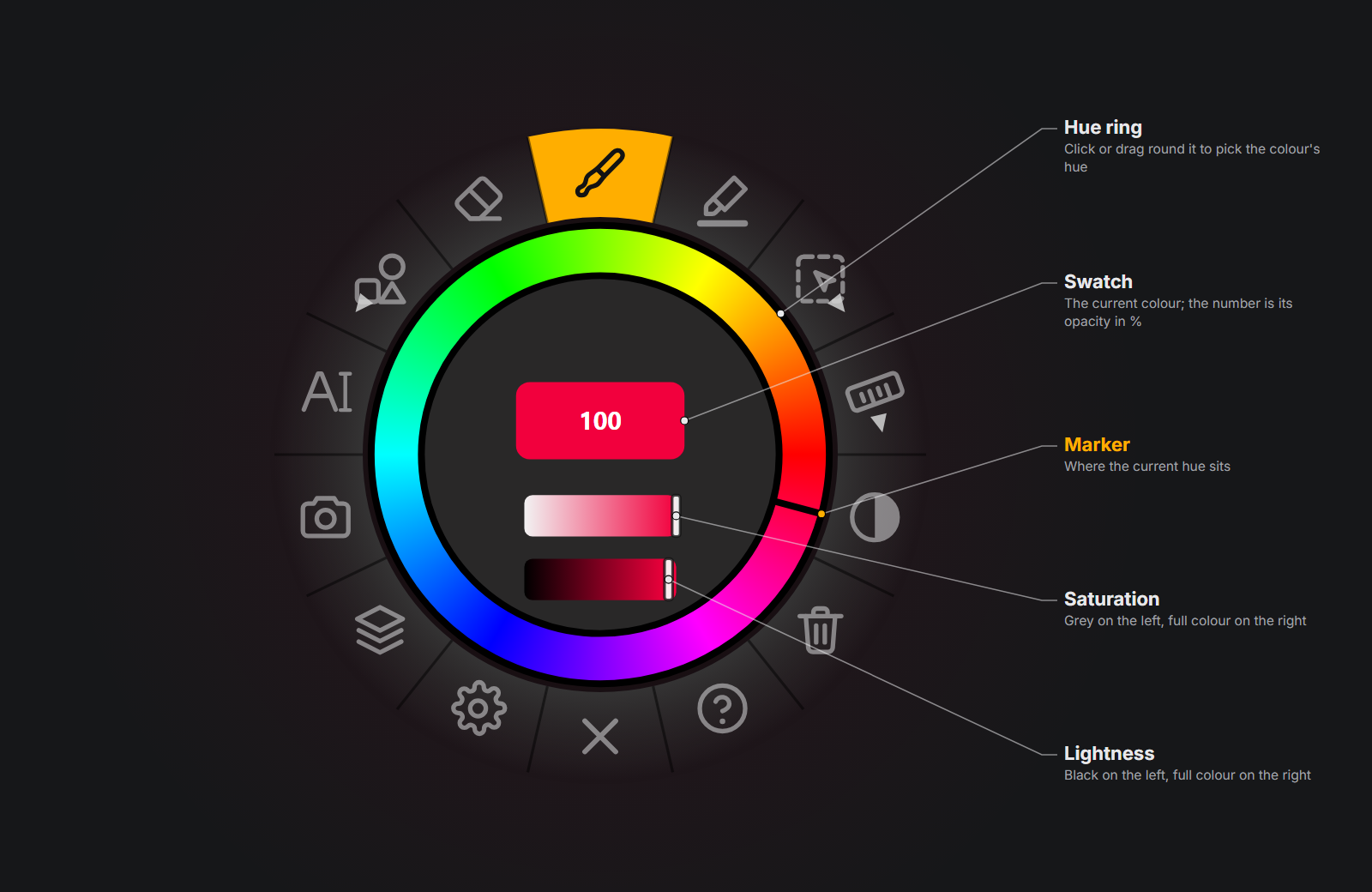
| Part | How to use it |
|---|---|
| Hue ring | Drag along it. Hue runs counter-clockwise from red at three o'clock. |
| Saturation slider | Grey on the left, full colour on the right. |
| Lightness slider | Black on the left, full colour on the right. |
| Swatch | Shows the colour; the number is its opacity in %. Ctrl + drag left / right on it to change the opacity. |
Every change applies to the brush immediately, and the brush colour is remembered when you quit.
Whose colour is it?
The ring sets the brush colour, shared by every brush. The highlighter, text, shapes and trace paper each keep a colour of their own, set by the Color swatch in their properties panels. With the Selection tool active and something selected, the ring recolours the selection.
Tab over the colour ring swaps the hue band for the swatches of your current palette — click one to pick it, press Tab again to go back.
The eyedropper
With the Brush in drawing mode, hold Alt: a loupe follows the pointer, magnifying the pixels eight times, with a ring in the colour under it and its hex code. Alt + click makes that the brush colour. Let go of Alt to stop.
It picks what you see — the app underneath with your drawing on top — so a half-transparent stroke gives the colour it shows, not the colour it was drawn with. It does not work over Am_sketch's own windows or over a measuring guide.
Pick Color
Click the Color swatch in any properties panel (Brush, Highlight, Text, Shape, Trace Paper) to open Pick Color.
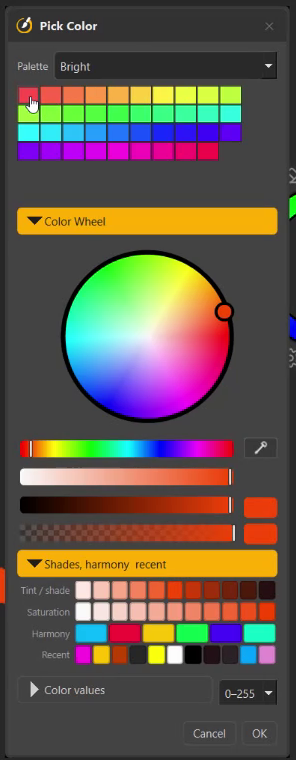
From the top:
- Palette — choose one of the fourteen palettes; its swatches fill the grid below. Point at a swatch to see its hex code.
- Color Wheel — click or drag on the wheel for hue and saturation, with Hue, Saturation, Lightness and Alpha sliders under it.
- The dropper button — click anywhere on any screen to take that colour. Esc or a right-click cancels.
- Current color and Original color — click the original to go back to the colour you started with.
- Shades, harmony & recent — rows of variations of the current colour:
- Tint / shade — lighter to darker,
- Saturation — greyer to purer,
- Harmony — complement (+180°), analogous (±30°), triad (+120°, +240°) and split complement (+150°),
- Recent — your last eleven colours.
- Color values (folded) — type exact numbers: Hue, Saturation, Value,
Alpha, Red, Green, Blue, in a 0–255 or 0–1 range, and Color code for
hex (
#RRGGBB, or the short#RGB). - OK (or Enter) keeps the colour and adds it to Recent; Cancel (or Esc) puts the original back.
Changes show on the brush live while the window is open.
Your own colours
Right-click the swatch grid:
- Add Color adds the picker's current colour to the palette on show — any palette, built-in ones included. The grid holds up to sixty swatches.
- Delete Color (on a swatch you added) removes it. Built-in swatches stay.
The Custom palette starts empty: it is the place for a set that is purely yours — your school's colours, a client's brand, a character's skin tones.
Recent colours
Am_sketch remembers your last eleven colours, newest first. A colour joins the list when you press OK in Pick Color, or click it in the colour library.
The fourteen palettes
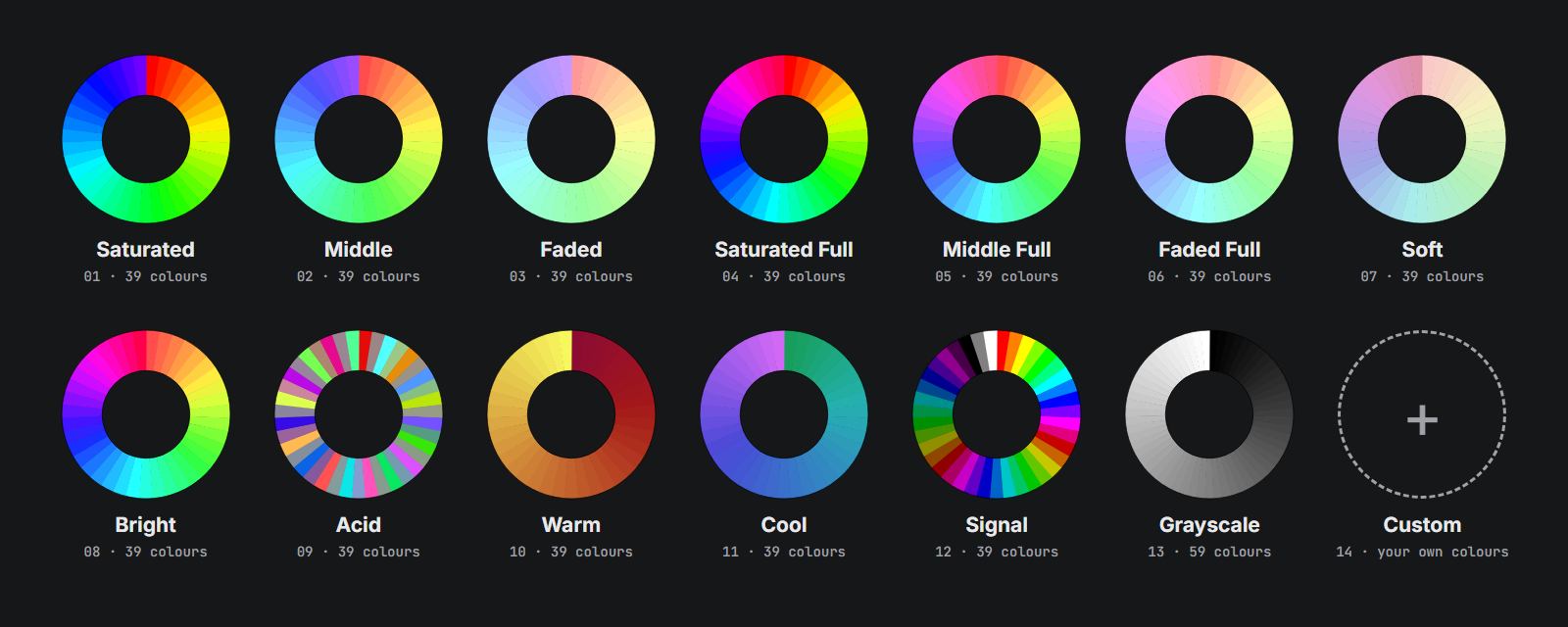
| Palette | Colours |
|---|---|
| Saturated, Middle, Faded | Twenty hues across most of the wheel at full, 70 % and 40 % saturation — strong, medium and pastel. |
| Saturated Full, Middle Full, Faded Full | The same three, round the whole wheel. |
| Soft | The whole wheel, quiet and low in colour — stays calm under a drawing. |
| Bright | The whole wheel at full brightness, growing more vivid round the circle. |
| Acid | Ten pairs: each hue followed by its opposite. |
| Warm | Deep crimson through orange to gold. |
| Cool | Deep sea teal through blue to lilac. |
| Signal | Six pure hues at three strengths, plus black and white. |
| Grayscale | Thirty steps from black to white. |
| Custom | Your own colours. While it is empty, the colour library shows Middle in its place. |
Between every two neighbouring colours the palettes add the colour halfway between them, so most palettes show 39 swatches (Grayscale 59).
The palette you choose is shared: Pick Color and the colour library always show the same one.