Updates
Once a day Am_sketch asks whether there is a newer version — and says nothing unless there is.
How it works
- About a second and a half after Am_sketch starts, it checks — at most once every 24 hours. (A copy left running for days checks again the next time it starts.)
- When there is nothing new, or no connection, you see nothing at all.
-
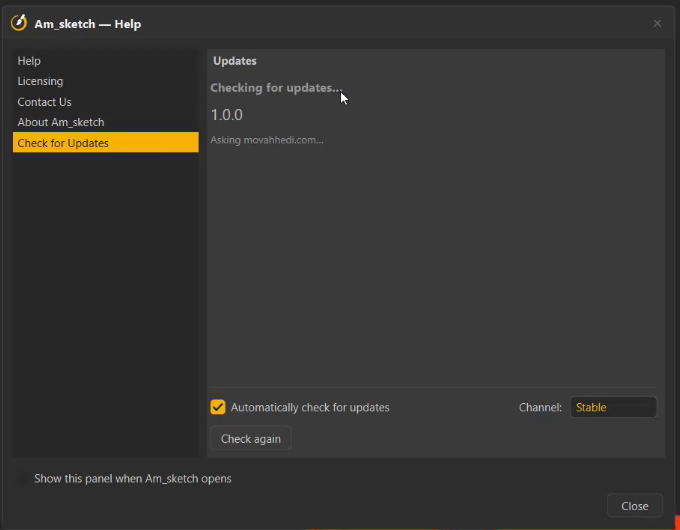
When there is a new version, the Help window opens on Check for Updates:
- installed → latest — for example 1.0.0 → 1.1.0,
- What's new, covering every release since yours,
- Download 1.1.0 — opens the download page in your browser. Nothing is installed without you: run the new installer over the old one, as in Install → Upgrading.
Checking by hand
- Right-click the tray icon → Check for updates..., or
- open Help (the ? on the ring) → Check for Updates, and press Check again to ask the server right now.
Your choices
| Control | What it does |
|---|---|
| Automatically check for updates | On by default. Off, Am_sketch never goes online by itself — use Check again when you want. |
| Channel | Stable: finished releases only. Beta: pre-releases too — newer, rougher, and you still get every stable release. Changing it checks again at once. |
| Skip | Stop reminding me about this version (a newer one still will). |
| Later | Remind me again tomorrow. |
An update marked important is shown even if you skipped or postponed it. Nothing is ever forced.
What is sent
The check is a single request to movahhedi.com with:
- the app's name and version,
- your channel (Stable or Beta),
- Windows as the platform,
- a random install ID — a number made up when the app first checked, not derived from anything about you or your PC.
Never your licence, your name, your email, or anything you drew.
If the check fails
Could not reach the update server — "This is almost always a firewall, a proxy or simply no connection — nothing is wrong with your install." Check your connection, or allow Am_sketch through the firewall, and press Check again.