Guides
Four measuring guides live under the ring's Measurement slot, and trace paper has a slot of its own. The guides sit on the screen like drawing instruments: they measure, and your strokes snap to them.
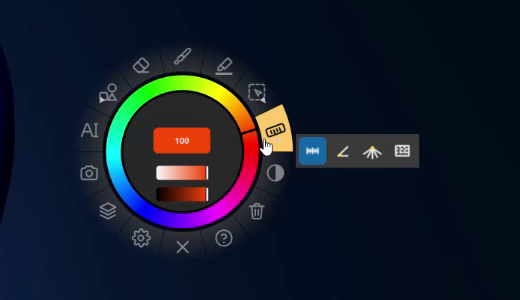
Showing a guide
| On the Measurement slot | What it does |
|---|---|
| Click | Show or hide the guide. It appears on the screen under the pointer. |
| Hold | Choose which guide: Ruler, Angle, Perspective or Proportion. |
| Right-click | Open the measurement properties. |
The guide is independent of the drawing tool: switch to the Brush, the Highlight or the Text tool and it stays where it is, until you click the Measurement slot again.
Working with a guide
- Handles — the blue dots, with an amber one at a corner or centre — are dragged directly, whatever tool you are using.
- Move the whole guide: hold Alt and drag its body, or drag it with the middle mouse button.
- Right-click the guide's body to change its units: Pixels, Millimeters or Centimeters for the ruler, Degrees or Radians for angles.
Strokes snap to it
With Snap brush to guides on (it is, at first), a brush stroke that comes within about 18 pixels of a guide follows it exactly:
| Guide | Strokes snap to |
|---|---|
| Ruler | either edge, or the centre line |
| Angle | the nearer arm |
| Perspective | the nearest ray |
| Proportion | the edges of the box |
Snapping applies to the Brush, not to the eraser.
Measurement properties
Right-click the Measurement slot:
| Setting | For | Options |
|---|---|---|
| Mode | all | Ruler, Angle, Perspective, Proportion |
| Live value | all | The current reading, large |
| Distance unit | Ruler, Proportion | Pixels, Millimeters, Centimeters |
| Angle unit | Angle | Degrees, Radians |
| Rays | Perspective | 3 – 48 (12 at first) |
| Guide | Proportion | None, Rule of thirds, Golden section, Diagonals |
| Infinite ruler | Ruler | Extend the ruler across the whole screen |
| Snap brush to guides | all | Called Snap brush to rays for Perspective |
Changing the mode puts a fresh guide on the current screen; a guide's position is not kept after Am_sketch closes.
Millimetres and centimetres are approximate
They are worked out from the main screen's reported resolution, not from a calibrated measurement of your monitor, so treat them as a guide rather than a ruler you could cut paper with.
- Ruler — a straight edge that measures.
- Angle — a protractor with two arms.
- Perspective — a vanishing point and its rays.
- Proportion — a box that names its ratio.
- Trace paper — a sheet over the screen.