Trace paper
A sheet laid over the screen, under your drawing. Opaque, it is a clean whiteboard; translucent, it lets you trace whatever is underneath.
Using it
Click the Trace paper slot. The sheet covers every screen Am_sketch works on (or the ones you choose), under everything you draw. Click the slot again to take it away. Your drawings stay either way.
The sheet is always off when Am_sketch starts.
Trace Paper settings
Right-click the Trace paper slot.
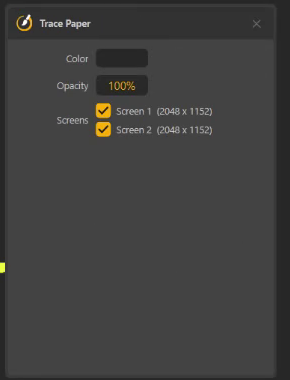
| Setting | What it does | Default |
|---|---|---|
| Color | The colour of the sheet | White |
| Opacity | 0 – 100 %: 100 hides the screen completely, lower values let it show through | 50 % |
| Screens | Which monitors get the sheet | All |
Three ways to use it
A whiteboard on demand
White (or a chalkboard green) at 100 %: a blank page over whatever you were showing. Work the problem, then take the sheet away — the slide is still there. The film's yellow chapter writes an equation this way.
Tracing a reference
White at 40 – 60 % over a photo: the shapes show through faintly, and your lines stand out against the paper. Draw, then lower the opacity to check against the photo.
A darker sheet for presenting
A dark grey sheet at 80 – 90 % dims a busy screen and makes bright ink pop — good on a projector.
Hide it for a moment
Ctrl+Shift+H — Hide trace paper — hides the sheet and the drawings on it until you press it again: a quick way to show the class what is underneath, then bring everything back.