Capture
Take a picture of part of the screen with your drawing on it — for the class notes, the bug report or the client email.
Taking a capture
- Click the Capture slot (the camera).
- The ring hides and the screen freezes: Am_sketch has taken a picture of the whole desktop with your drawings and trace paper on top. A hint says Screenshot mode — Drag to select a region. Press Esc to cancel.
- Drag round the part you want. Outside it the screen dims; a blue frame and a W x H label show what you are taking. The region can cross from one monitor to the next.
- Let go. What happens next depends on the Output setting.
A region smaller than 4 × 4 pixels cancels the capture, as does Esc.
Where it goes
Right-click the Capture slot for Capture Properties:
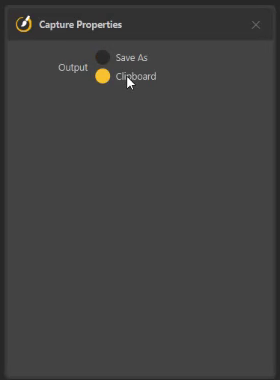
| Output | What happens |
|---|---|
| Save As (default) | A Save screenshot window opens in your Pictures folder, with a name like screenshot_20261001_143005.png. Save as PNG, JPEG or BMP. |
| Clipboard | The picture is copied, ready to paste into a document, a chat or an email. A notification says Screenshot copied to clipboard. |
No key for it yet
Screenshot is one of the commands with no shortcut until you give it one. Assign one in Preferences → Shortcuts and capture without reaching for the ring. Pick a key none of your other programs use — Ctrl+Alt+F9, say — because Am_sketch's shortcuts work in every program.
Capturing a selection
With the Selection tool, the Capture selection
button on the action bar saves just your drawing inside the selected region
— strokes, shapes, text and trace paper, without the screen underneath — as
selection_….png. Use it to lift a sketch or a diagram off whatever was behind
it.
Good to know
- Screenshots can only be taken on the monitors Am_sketch works on (Preferences → Screens).
- On a display scaled above 100 %, the picture is saved at the scaled resolution — a 4K screen at 200 % gives a 1920 × 1080 picture.
- Some programs' see-through or floating windows may be missing from a capture, and video that is protected against copying can come out black.