Preferences
Click the Preferences slot on the ring (the cog, lower left). The window has two pages: General and Shortcuts. Changes on General take effect — and are saved — straight away.
General
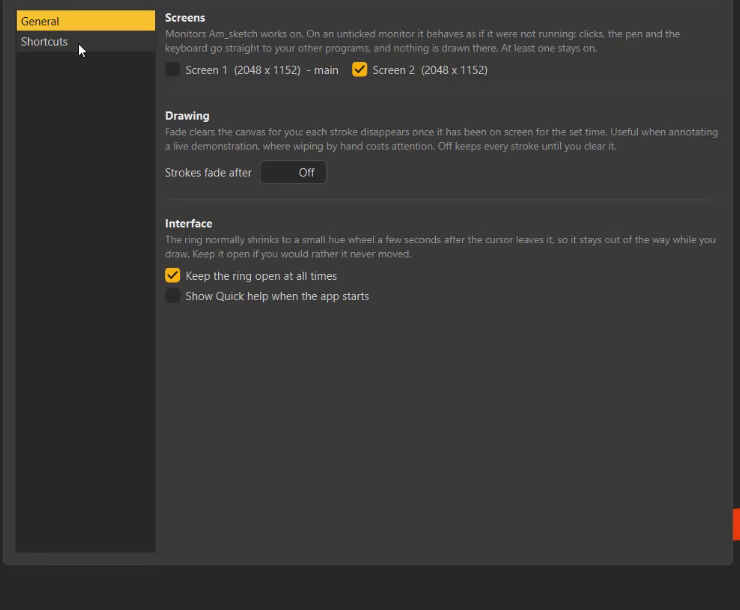
Screens
One box per monitor — Screen 1 (2560 x 1440) - main, and so on. All are ticked at first.
On an unticked monitor Am_sketch behaves as if it were not running: clicks, the pen and the keyboard go straight to your other programs, nothing is drawn there, and no trace paper covers it. At least one monitor always stays on.
Presenting from a laptop
Untick the laptop's own screen while the projector shows the slides: Am_sketch stays on the projector, and your notes on the laptop stay clickable.
Drawing
Strokes fade after — Off (default), or 1 – 60 seconds. With a time set, every stroke, shape and text fades out over four seconds once it has been on screen that long. See Undo, clear and fading.
Interface
| Setting | Default | What it does |
|---|---|---|
| Keep the ring open at all times | On | Off lets the ring shrink to a small hue wheel three seconds after the pointer leaves it, while you draw with the Brush, Eraser, Shape, Text or Highlight tool. |
| Show Quick help when the app starts | On | Opens the Help window at every start. The same switch sits at the bottom of the Help window: Show this panel when Am_sketch opens. |
Shortcuts
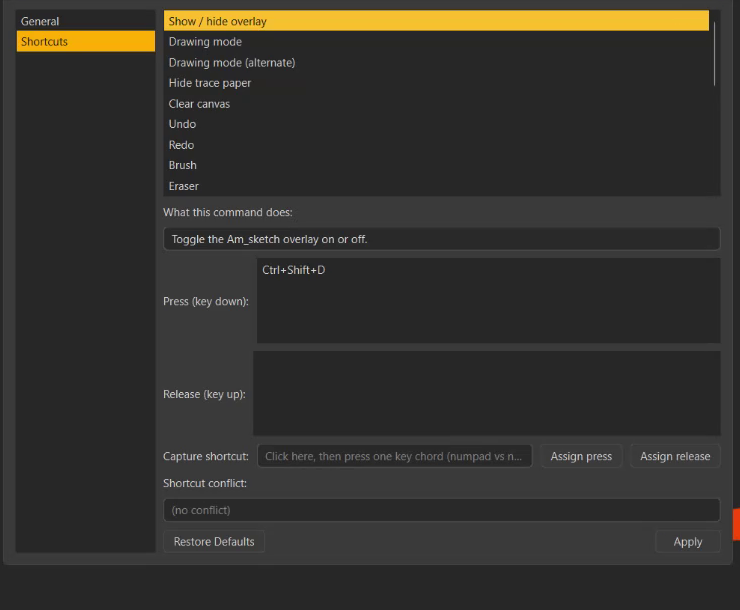
To give a command a new key:
- Click the command in the list. What this command does describes it, and Press (key down) shows its current key.
- Click the Capture shortcut field and press the key combination you want. (Esc clears the field.)
- Press Assign press.
- Shortcut conflict warns if the key is already used by another command.
- Press Apply to save and start using it.
To remove a key, right-click it in the Press list → Remove selected, and Apply. Restore Defaults puts every command back as it shipped (press Apply to keep that too).
Which keys work
A shortcut is a letter, a digit or F1 – F12 with Ctrl, Shift, Alt and/or Win. Only a command's first key in the Press list is used; Release (key up) entries are kept but do not trigger anything.
A key another program already uses
Shortcuts are reserved for Am_sketch in every program. If another app holds a key first, Am_sketch says so in a notification — Some hotkeys are already used by another app or use unsupported keys — and that command stays without a key. Pick another one here.
The full list of commands is in Keyboard and mouse.
Without a licence
Until a licence is imported, the Preferences slot opens Help → Licensing instead. See Activate your licence.