
Pose the rig by clicking the picture
Am_Picker is a graphical animation picker for Autodesk Maya. A rigger draws the control layout once — shapes, colours, the character's own artwork — and from then on the whole team animates by clicking it, instead of hunting for a curve in the viewport or a name in the Outliner.
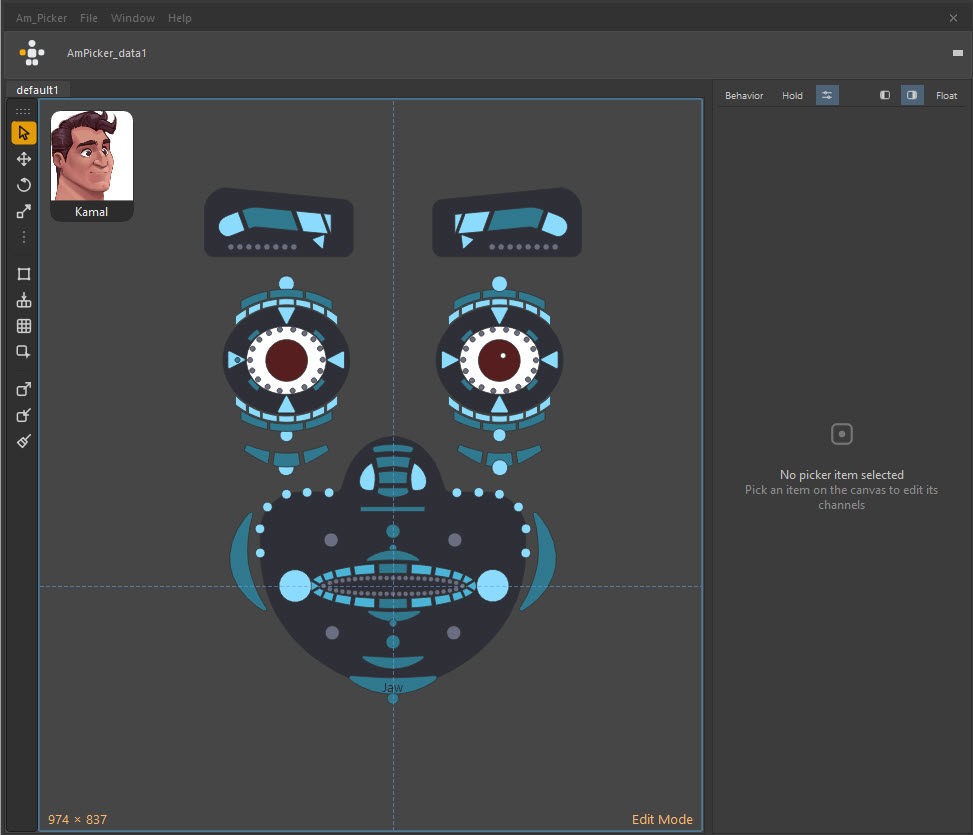
Start where you are
-
I just want it running
One file, dragged into a Maya viewport. It installs into the shared AM_Tools module and puts a button on your shelf.
-
Somebody gave me a picker
You are an animator. Open it, point it at your rig, and start posing — including what to do when the picker looks right but selects nothing.
-
I have to build one
You are the rigger. Draw shapes, bind controls, arrange, colour, and hand something over that survives being used every day.
-
I want it to do more
Per-item Python and MEL, items that drive an attribute instead of selecting, and the API for opening the window from your own tools.
New here? Watch it first
Two videos, twelve minutes, every shortcut on screen — Video tutorials.
What it does
Draw the layout the way the character looks. Shapes are freehand polygons, pen-tool Bézier outlines, presets from a library, or artwork you already have — trace a concept drawing, or import an SVG and get one item per outline.
One picker, every copy of the rig. Items store their controls without a namespace, so a single picker file drives any referenced instance of the character. Pointing it at the right one is a single dialog.
It lives with the scene. The picker is a node inside your Maya file, so it
travels with the shot. It can also be exported as a self-contained .ampkr
package — images included — for sharing between scenes and artists.
It is not only a selector. An item can drive a Maya attribute directly: drag it as a slider for an IK/FK blend, click it as a toggle, or pop an enum for a space switch. Any item can also run your own Python or MEL.
Build one side. Duplicate + mirror swaps names and bound controls to the other side, and live mirror keeps the pair matched while you keep editing.
Widgets that drive the rig. Sliders, dials, switches and 2D sliders from the Widgets panel, live both ways — and organised in layers you can move like Maya groups.
Two modes, one window. Edit mode is where a picker gets built — gizmos, grids, alignment, an outliner. Anim mode is what everyone else sees: a clean picture that selects controls. Alt+W swaps between them.
The shape of the tool
| Canvas | The page you draw on. One per tab; each tab has its own layers, grids, bookmarks and background art. |
| Picker item | One clickable shape. It carries controls to select, colours, an optional script, and optionally an attribute to drive. |
| Edit / Anim mode | Authoring versus using. Almost every edit tool is gated behind Edit mode so an animator cannot move the furniture by accident. |
| Data node | The Maya node the picker is stored in — AmPicker_data1 by default. A scene can hold several, one per character. |
.ampkr file |
The picker as a portable package: layout, images and all. Optional — a picker that only ever lives in one scene never needs one. |
Requirements
| Maya | 2022 – 2026, on Windows, macOS or Linux |
| Qt | PySide2 and PySide6 are both supported — whichever your Maya ships |
| Python | Whatever Maya embeds; 2.7 and 3.x both work |
| NumPy | Optional. Speeds up image tracing, colour grading and the colour wheel. Everything degrades gracefully without it. |
| OpenCV | Optional. Adds extra edge-detection modes to Image to Picker. |
This documentation covers Am_Picker 1.0.0-beta.1
Menu names, dialogs and default keys are written against that build. If something on your screen does not match, check Help → About for the version you are running, and Updates for what changed.
Licence
Am_Picker is MIT licensed — free to use, including commercially.