Shape library
77 ready-made shapes, and somewhere to keep your own.
Window → Shape Library…, or Ctrl+Space.
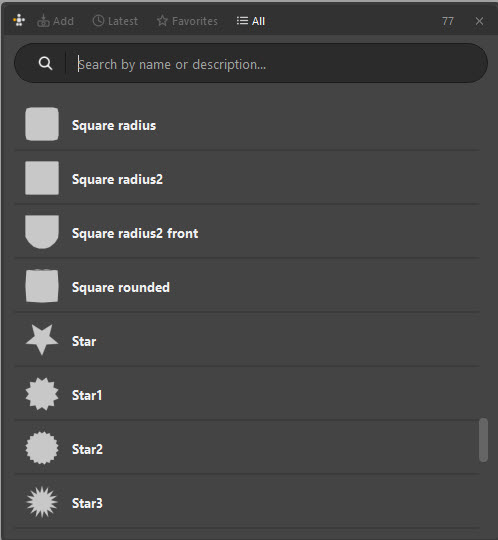
Using it
Click a shape to apply it to the selected items, or drag one onto the canvas to place a new item.
| Control | Does |
|---|---|
| Search | Filter by name or description |
| All | Everything in the library |
| Latest | What you used most recently |
| Favorites | The ones you starred |
| Add | Save the selected canvas item as a new library entry |
The counter in the corner tells you how many entries match — 77 with an empty search, on a stock install.
Why keep a library
Consistency. A picker where every FK control is the same circle and every IK control is the same square reads instantly. One where each button was drawn by hand at a slightly different size reads as noise, however carefully it was arranged.
Across characters. The library is not part of any one picker — it is yours, and it persists between scenes. The button vocabulary you settle on for one character is one click away on the next.
Curve shapes. Entries can come from Maya NURBS curve shapes, so the picker button can be the actual silhouette of the control it drives.
Saving your own
Draw the shape on the canvas, get it right, select it, and press Add in the
library. Give it a name that will mean something in six months — fk_circle,
ik_box, brow_tick — and a description if the name is not enough.
Entries carry a thumbnail rendered from the shape itself, holes and all, so a ring-shaped entry looks like a ring in the list rather than a solid blob.
Save the vocabulary, not the picker
The library is for the handful of shapes you reuse — five or ten, not five hundred. Everything specific to one character belongs in that character's picker. A library with two hundred one-off entries is a library nobody searches.
Where it lives
The library is stored with Am_Picker's own data as shape_library/library.json,
with a PNG icon per entry, and is shared by every picker you open. Copy that
folder to move your library to another machine or hand it to a colleague.
Saving a library entry can fail quietly
If the library folder is read-only — some studio installs are — adding an entry can fail without telling you. If a shape you added is not there next session, check that Am_Picker's install folder is writable, or install to your user folder instead of a shared network location.