Channel Box
Maya's channel box, for picker items. Numbers instead of gizmos, when a number is what you actually want.
Window → Picker channel box, or Ctrl+A.
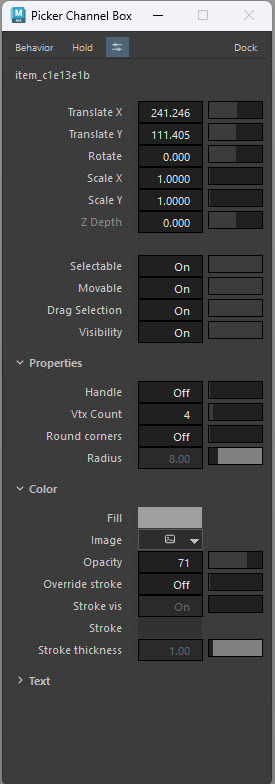
Why use it
A gizmo is right for "a bit to the left". It is wrong for "exactly 40 wide, like the other eleven". The channel box is where a layout stops being approximately right.
It is also the only place several per-item flags live at all — selectable, movable, drag-selection, handle display.
The channels
Transform
| Channel | What it is |
|---|---|
| Translate X / Y | Position on the canvas |
| Rotate | Rotation in degrees |
| Scale X / Y | Size |
| Z Depth | Stacking order — higher draws on top |
Behaviour
| Flag | Off means |
|---|---|
| Selectable | The item cannot be picked in Anim mode at all |
| Movable | The item cannot be dragged, even in Edit mode. Lock a finished layout |
| Drag Selection | The item does not take part in marquee selection |
| Visibility | The item is not drawn |
Drag Selection is the fix for click-swallowing
A large background item that keeps catching clicks meant for small buttons on top of it: turn Drag Selection on and normal selection off, and it can only be caught by a marquee — the buttons stay clickable.
Properties
| Channel | What it is |
|---|---|
| Handle | Show the item's vertex handles |
| Vtx Count | How many vertices the shape has |
| Round corners / Radius | Corner rounding for closed polygons |
Colour
| Channel | What it is |
|---|---|
| Fill | The item's colour |
| Image | An image used as the item's fill |
| Opacity | 0–100 |
| Override stroke, Stroke vis, Stroke, Stroke thickness | Per-item outline, overriding the picker-wide setting in Preferences |
Text
Label text carried on the item, with its own font, size and colour.
The quick way to set the text itself is to double-click the item on the canvas and type; this section is where the typography lives.
Editing
Type a value into a field and press Enter.
Multi-select. Select several items and an edit applies to all of them. This is how a row of buttons gets the same width, or twelve items get the same Z depth.
MMB scrub. Drag with the middle mouse button on a channel's label to scrub its value — the same gesture as Maya's channel box. Modifier keys change the speed.
Shift / Ctrl multi-cell selection works in the channel table the way it does in a spreadsheet.
Docking
Window → Channel box dock…
| Option | Result |
|---|---|
| Dock left of tabs | Attached to the left of the canvas |
| Dock right of tabs | Attached to the right — as in the screenshots throughout this documentation |
| Floating window | Free-floating, positionable anywhere |
Where you put it, and whether its strip is collapsed, persists between sessions.
A docked channel box makes the window wider
The canvas size is the canvas, and a docked channel box adds its own width on top of it. If you build with it docked, the window an animator opens will be narrower than yours. Check the layout with it undocked before handing the picker over.
Anim mode
The channel box is an Edit-mode tool — it edits the picker item, not the rig. An animator wanting to edit the rig's channels uses Maya's own channel box.
The exception is attribute control: an item configured as a slider, toggle or enum does write to the rig, in both modes, because that is what it is for.