Tabs, panels and grids
Three ways to structure a picker bigger than one page — and they are not interchangeable.
| Scope | Use it for | |
|---|---|---|
| Tab | A whole page, with its own canvas, layers, grids, bookmarks and art | Body / face / hands, or one character each |
| Panel | A sub-page floating on a canvas | A face board on top of a body picker |
| Grid | An origin that items align and mirror against | Making the face mirror about the face |
Tabs
Each tab is an independent picker page. Switching tabs changes everything — canvas, layers, background images, camera bookmarks, the character portrait.
Right-click the tab bar in Edit mode:
| Command | Does |
|---|---|
| Add Tab | A new empty page |
| Rename Tab | Name it something an animator will understand |
| Remove Tab | Delete it and everything on it |
| Move Tab ‹‹‹ / ››› | Reorder |
Switching tabs and bookmarks
Ctrl+Tab opens the switcher, which lists tabs and camera bookmarks together, most recently used first — like Alt+Tab.
| Input | Does |
|---|---|
| Ctrl+Tab | Open on the least recently used entry and step back through the list |
| Ctrl+Shift+Tab | Open on the one you were on before — a quick tap goes back, the next one returns |
| Left / Right | Move |
| 1 – 9 | Jump straight to an entry |
| Enter / click | Go |
| Esc | Change your mind |
A Tabs / Bookmarks / All filter at the top carries its own counts, so an empty list explains itself, and tabs you are not looking at show real thumbnails.
How many tabs
Two or three. Body and face covers most characters, with hands if the hands are complicated enough to deserve their own page.
The failure mode is a tab per body part: eleven tabs means an animator is hunting through tabs instead of looking at a picture, which is the thing the picker was supposed to fix.
Panels
A panel is a sub-page that floats on a canvas rather than replacing it. Add one from canvas menu → Add Panel.
Panels have their own layers, nested under them in the Picker Outliner and in the Anim-mode Panels menu.
Panel or tab?
Use a tab when the two things are looked at separately — nobody needs the body controls while animating a blink.
Use a panel when they are looked at together — a hand board beside the arm it belongs to, so you can pose the arm and curl the fingers without switching page.
The animator can always collapse a panel from the canvas right-click, even one you gave no collapse tab, so a panel that is occasionally in the way is not a trap.
Grids
Window → Picker Grid
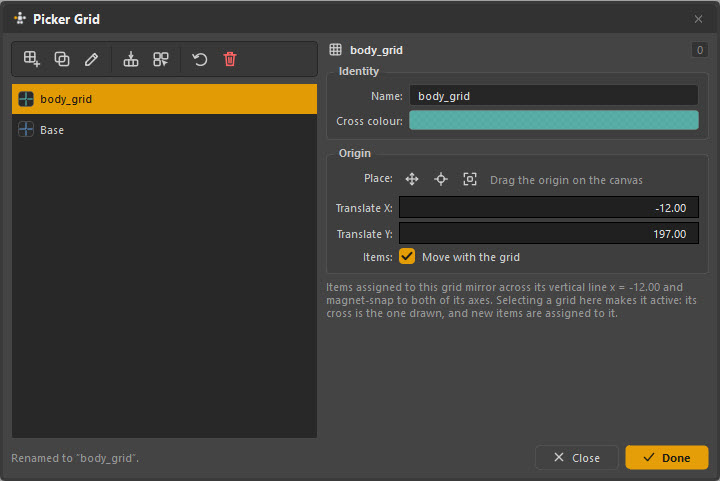
A grid is an origin — a cross on the canvas that items align and mirror
against. Every picker starts with one, called Base.
| Field | What it does |
|---|---|
| Name | What it is called in the Outliner and the grid list |
| Cross colour | The colour of its cross on the canvas |
| Place | Drag the origin on the canvas, or centre it |
| Translate X / Y | The origin's position numerically |
| Move with the grid | Whether items assigned to this grid follow when the origin moves |
Why a second grid
Because a character's face is not in the middle of the window.
Items assigned to a grid mirror across that grid's vertical line and snap to its axes. With one grid at the canvas centre, mirroring a left eyebrow sends it to the far side of the window instead of the other side of the face.
Make a face_grid centred on the face, assign the face items to it, and
Ctrl+Shift+D mirrors an eyebrow to where the other eyebrow actually is. The
screenshot above shows exactly that: a body_grid with its origin moved to
-12, 197, and the note "Items assigned to this grid mirror across its vertical
line x = -12.00 and magnet-snap to both of its axes."
The active grid
Selecting a grid in this window makes it active: its cross is the one drawn, and new items are assigned to it. Set the grid you want before you draw a region, not after.
Putting them together
A typical two-tab character:
Tab "body"
├── grid Base          — canvas centre, for the torso and limbs
└── layers Main / IK / FK / Tweakers

Tab "face"
├── grid face_grid     — centred on the face artwork
├── panel "L hand"     — a hand board, collapsible
└── layers Main / Brows / Mouth / Eyes
Tabs for pages people switch between, panels for things wanted side by side, layers for things people turn off, grids wherever symmetry has its own centre.