Item scripts
Python or MEL, run when an item is clicked, written in an editor that knows Maya's commands.
Open Picker Behavior — select the item and press I — and use the script editor at the bottom.
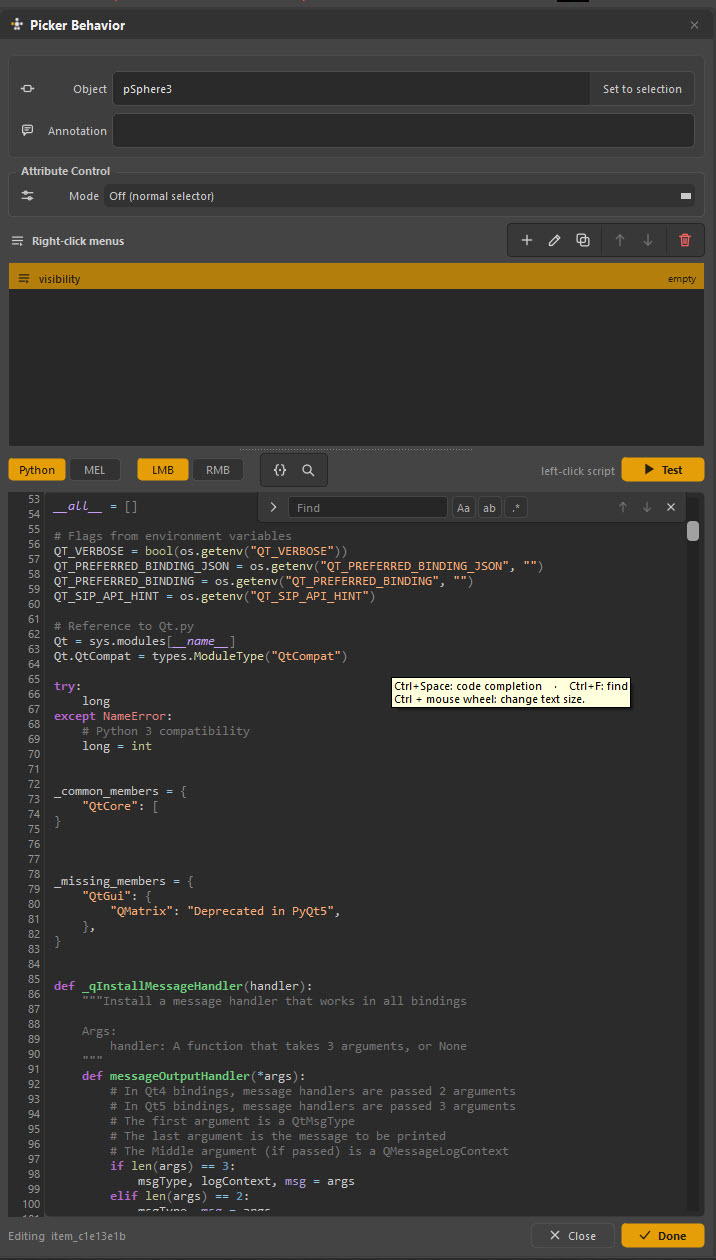
The editor
| Control | What it does |
|---|---|
| Python / MEL | Which language this script is |
| LMB / RMB | Which mouse button runs it |
| {} and the magnifier | Insert a variable, and find |
| Test | Run it now, in Maya, without leaving the dialog |
The editor is a real code editor: syntax highlighting for both languages, line
numbers, code completion for maya.cmds and MEL, find and replace, and
Ctrl + wheel to change the text size.
Test is the important one. It runs the script against the currently selected item so you can iterate without switching modes and clicking the shape.
Editing keys
Available whenever the script field has focus:
| Key | Does |
|---|---|
| Ctrl+/ | Toggle comment |
| Alt+Up / Alt+Down | Move the line or selection |
| Ctrl+D | Duplicate the line |
| Ctrl+Shift+K | Delete the line |
| Num Enter | Run the selection, or the whole script |
| Alt+` | Run just the current line |
| Ctrl+F / Ctrl+H | Find / find and replace |
| F3 / Shift+F3 | Next / previous match |
| Ctrl+Space | Code completion |
Completion sources, the editor font and the syntax colours are all configurable — see Preferences.
A first script
Every item script gets a set of variables describing the item that ran it. The
most useful is __FLATCONTROLS__, the item's bound controls with their
namespace already applied:
import maya.cmds as cmds

# Zero out the controls this item is bound to.
for ctrl in __FLATCONTROLS__:
    for attr in ("translateX", "translateY", "translateZ",
                 "rotateX", "rotateY", "rotateZ"):
        if not cmds.getAttr(ctrl + "." + attr, lock=True):
            cmds.setAttr(ctrl + "." + attr, 0)
The full list is in Script variables.
The __INIT__ guard
Scripts can run at times you did not intend — as an item is created, for
instance. __INIT__ exists so a script can tell the difference:
Wrap anything with side effects in it. A script that selects something is harmless; one that bakes a limb is not.
Right-click menus
The Right-click menus section adds entries to this item's right-click menu in Anim mode. Each entry has a name and its own script.
Use it to hang several related commands off one button without changing what a plain click does:
- a shoulder button that selects on click, and offers reset, key all and mirror pose on right-click
- a foot control that offers pin to world and unpin
The buttons above the list add, edit, duplicate, reorder and delete entries. An
entry with no script yet is marked empty.
Right-click menus are more discoverable than they look
Animators do try right-clicking things. A picker whose main buttons quietly offer their three most-wanted commands is far more useful than one where those commands live in a shelf somewhere.
Practical patterns
import maya.cmds as cmds

if not __INIT__:
    for ctrl in __FLATCONTROLS__:
        for attr in cmds.listAttr(ctrl, keyable=True) or []:
            plug = ctrl + "." + attr
            try:
                default = cmds.attributeQuery(
                    attr, node=ctrl, listDefault=True)[0]
                if not cmds.getAttr(plug, lock=True):
                    cmds.setAttr(plug, default)
            except Exception:
                pass
Things to be careful about
Import inside the script. Do not rely on a module having been imported elsewhere — the picker may be the first thing to run in a fresh Maya.
Fail softly. An exception in an item script is a click that appears to do nothing. Wrap anything that can fail and print something useful.
Do not assume the namespace. Use __NAMESPACE__ or __FLATCONTROLS__
rather than hard-coding kamal:. A hard-coded namespace defeats the entire
point of the picker's namespace handling.
Keep it short. A picker item is a button, not a place to keep a tool. If a script is more than about twenty lines, put it in a studio module and call it from the item.