Camera bookmarks
Save a viewport angle to a key, and get back to it without touching the viewport.
B Open bookmarks Ctrl+Tab Quick switcher Double-click a row to apply
Window → Camera Bookmarks, or B.
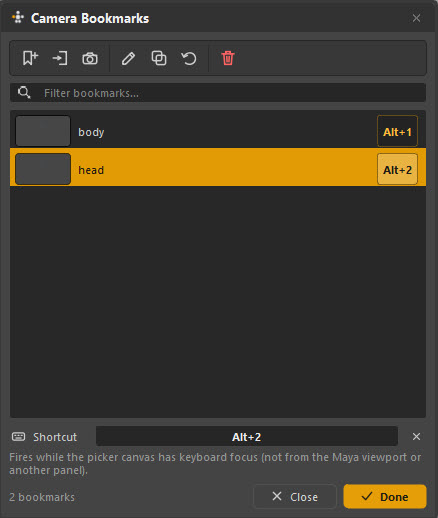
What a bookmark is
A saved camera position — the angle, the framing, the lens. Applying one moves the Maya viewport camera back to it.
The everyday use is the pair of angles you keep flipping between while animating one thing: a wide for the body, a tight one on the face. Set them up once at the top of the shot and you stop re-framing all day.
Bookmarks are per tab, which usually means per part of the character. The face tab's bookmarks are face angles; the body tab's are body angles.
Using them
| Action | How |
|---|---|
| Apply | Double-click the row |
| Apply by keyboard | Press its shortcut — Alt+1, Alt+2, … |
| Find one | Type in the filter box |
| Create from the current view | The add button on the toolbar |
| Update to the current view | Select it, then the capture button |
| Rename | The pencil button |
| Delete | The bin |
The thumbnail beside each row is the view it will take you to, so a list of six does not become six guesses.
Shortcuts
Each bookmark can hold a keyboard shortcut, shown on the right of its row. Select a row and set it in the Shortcut field at the bottom.
The picker canvas has to have focus
A bookmark shortcut fires while the picker canvas has keyboard focus — not from the Maya viewport, and not from another panel. Click the picker once, then use the shortcut.
This is deliberate: Am_Picker does not install shortcuts into Maya itself, so it can never fight your studio's hotkeys or a plugin's. Everything it binds only exists inside its own window.
The quick switcher
Ctrl+Tab opens an overlay listing tabs and bookmarks together. Hold Ctrl and press Tab to walk through them, release to go.
It is the fast path when you are working across a face tab and a body tab and want to change both page and camera in one gesture. Whether it lists tabs, bookmarks or both is configurable.
Bookmarks and the picker view are different things
Two similar-sounding things, worth separating:
| What it moves | |
|---|---|
| Camera bookmark | The Maya viewport camera |
| F and 0 | The picker canvas view — how the picker itself is framed inside its window |
0 resets the picker's own framing to whatever the tab was built at. It has nothing to do with the viewport.