Rigs and namespaces
The one page that turns a picker that "doesn't work" into one that does.
The problem this solves
A picker item does not store kamal:L_hand_ctrl. It stores L_hand_ctrl —
the control's name with no namespace on the front.
That is deliberate. When a rig is referenced into a shot, Maya prefixes every
node with a namespace: kamal:L_hand_ctrl, or kamal2:L_hand_ctrl for the
second copy, or char_a:L_hand_ctrl in a scene that names things differently.
If the picker stored the full name it would only ever work in the one scene it
was built in.
One picker, every copy of the rig
Storing controls without their namespace means a single picker file drives any referenced instance of that character — the hero in shot 010, the same character in shot 240, and both copies of him in the two-shot. The rigger builds one picker. The alternative is a picker per shot, hand-edited, going stale the moment the rig is republished.
The cost of that choice is one piece of information the picker cannot guess: which copy do you mean. That is what this dialog is.
Set Namespace
Right-click empty canvas → Set Namespace…
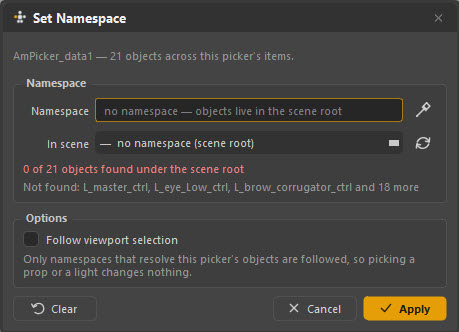
The screenshot above is exactly the failure case: the picker is looking under the scene root, 0 of 21 objects found, and it lists the names it could not find. Nothing this picker does will work until that line is happy.
Four ways to fill it in
| Way | When to use it |
|---|---|
| The eyedropper | Select any control on the right rig in the Maya viewport, then press the eyedropper. This is the fastest and the hardest to get wrong. |
| The scene list | Pick from every namespace in the scene. The list is ordered best match first, which matters in a shot with several characters. |
| Type it | If you know it. |
| Clear | Go back to the picker node's own namespace — the right answer for a picker that ships inside the referenced rig. |
Read the count before you apply
As you change the namespace the dialog re-checks it against this picker's own objects and reports what it finds:
48 of 48 objects found
That is a working picker. Anything less means you have the wrong copy, an out-of-date rig, or controls that were renamed since the picker was built — and you can see it before you apply, rather than by clicking around afterwards and wondering.
The line under the count names the objects it could not find, which is usually enough to tell "wrong character" from "rig changed".
Follow viewport selection
Tick Follow viewport selection and the picker retargets itself: select a control belonging to another copy of the rig and the picker switches to that copy on its own.
This is the option you want on a two-hander. It is careful about it — only namespaces that actually resolve this picker's objects are followed, so clicking a prop, a light or the other character's rig does nothing.
Where the setting is kept
The namespace is stored on the picker data node, so it survives closing and reopening the scene. Set it once per shot, not once per session.
Referenced picker nodes
If the picker node itself came in through a reference, Maya will not let anything write to it — so the namespace holds for the session but is not saved. Set it again after reopening, or use Follow viewport selection so it sorts itself out.
Which case are you in?
-
The picker is inside the rig
The rigger built the picker into the character file, so it arrives with the reference. Its node is namespaced the same as the controls, and the correct setting is usually Clear — the picker's own namespace is the answer.
-
The picker is a file you opened
You loaded an
.ampkrinto the shot. The picker node sits in the scene root with no namespace, so it needs telling which character it is for — eyedropper, once. -
Two copies of one character
Either open a picker per copy and set each one's namespace, or use a single picker with Follow viewport selection and let it track whichever one you are working on.
-
No namespace at all
The rig was imported rather than referenced, so the controls have plain names. Clear the namespace and the picker matches the scene root directly.
Quick diagnosis
| What you see | What it means |
|---|---|
| 0 of n objects found | Wrong namespace, or the rig is not in the scene at all |
| 31 of 48 objects found | Right character, but the rig changed since the picker was built — some controls were renamed or removed |
| 48 of 48, still nothing selects | Not a namespace problem. Check you are in Anim mode, and see Troubleshooting |
| The list keeps resetting | The picker node is referenced — see the warning above |